


Easy language
The additional module "Plain language" can be used to store and display texts in plain language for existing text fields. With a licensed module and current Weblics® (continuous text, headline), the required functions are displayed for the text fields.
If desired, the translation can be supported by an AI-generated text suggestion in plain language.
You can use the module
Without AI
You can translate the texts in plain language manually and store them in each text field alongside the conventional texts.
With AI
If you wish, you can also have the translation of the texts into plain language suggested for each text field based on AI, correct the suggestions and then transfer them to the plain language fields with a click. To do this, you need an account for an AI system (see below).
Various AI systems can be used
Weblication ® is completely technology-agnostic for various AI systems. For example, the following can be connected:
- OpenAI / ChatGPT
- capito
- SUMM AI
- Other AI systems on request
When using OpenAI, you will find further information in the description of the AI interface. You can create the link to capito and SUMM AI in the project configuration.
Operation
To use the module, activation via the Weblication® CMS license key is required. The implementation is based on the current BASE project basis with current Weblics® (continuous text, etc.).
To be able to maintain texts in plain language for continuous text fields, activate the corresponding setting in the project configuration.
- Separate texts can be maintained in plain language
If this setting is activated (Yes), the functions for entering plain language texts are offered in the editor for the text fields. - Automatically generate separate texts in plain language
If this setting is activated (Yes), texts in text fields are automatically translated when plain language is activated for the website (Accessibility menu). This requires a link to an AI provider with a corresponding API key or token. - Path with images for plain language
The selection arrow for the field can be used to select the directory containing the images (pictograms) that can be added to text fields. - Link Optimeil easy-to-read tools
If this setting is activated (Yes), links to the "Optimeil easy-to-read tool" are displayed in the AI text generator when maintaining the easy-to-read language. This provider offers these tools for optimizing texts for plain language. - Capito Easy Language login token
You can optionally enter the Capito login token in this field.
You can obtain the token on your profile in the API tab
https://www.capito.eu - SUMM AI® Easy Language access data
In this field, you can optionally enter the access data for SUMM AI®.
The access data consists of your login e-mail and the SUMM AI API key, i.e. Anemdemail@domain.dd:SUMMAIAPIKEY
https://summ-ai.com/

Continuous text fields with plain language
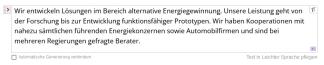
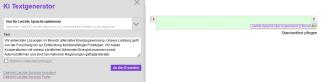
You can store and maintain the texts for plain language via a separate input field. If no text for plain language has yet been entered for a text field, a "Maintain plain language text" link appears for the field. Click on the link to open a separate input field (green). You can either write the text directly in this field or copy it. Alternatively, you can also use the template for plain language available as standard via the AI assistant.
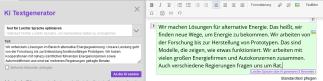
The content in plain language can also be maintained via Quick-Edit, so that only the field to be maintained is loaded for editing rather than the entire editor.
You can also see in the Quick-Edit icon whether text already exists for the field in plain language. The icon for plain language shows a figure in red if there is no plain language for the text field and a figure in green if there is already plain language text.
There is also AI support via Quick Edit for automatic translation of the text into plain language.
Title and description in plain language
The headline and description of, for example, the current messages (news) can also be output in plain language if required. For the list display of the object, the "Output object data in the list" element already has the option of automatically generating the output for plain language (AI required).
This can also be enabled for the "Page display of the object" if required. By default, the heading (title) and description for calling up the respective detail page are not prepared for plain language.
If the text is also to be output in plain language at the point of accessibility menu selection, the easiest way to define the output is via a heading or continuous text field. Alternatively, you can also use the conditional content container for plain language.
Display plain language via Accessibility menu
An accessibility menu (available as Weblic®) can be called up via the current BASE project base using an icon. This also includes the option of displaying pages in plain language.
If texts in plain language are stored in a page, the texts in plain language are displayed instead of the normal texts if plain language -> On is selected in the accessibility menu. In addition, non-existent texts can also be automatically displayed in plain language when the page is called up.
The accessibility menu is already integrated in the current BASE and can be retrofitted manually in older projects.